Release Notes
Want to know what's new?
To stay current on the most notable feature updates, take a look at the latest release notes. For older, legacy releases, see the release notes history.
| Release | Features and fixes |
|---|---|
| May 2026 |
|
| March 2026 |
|
| February 2026 |
|
| January 2026 |
|
May 2026
Enhancement:
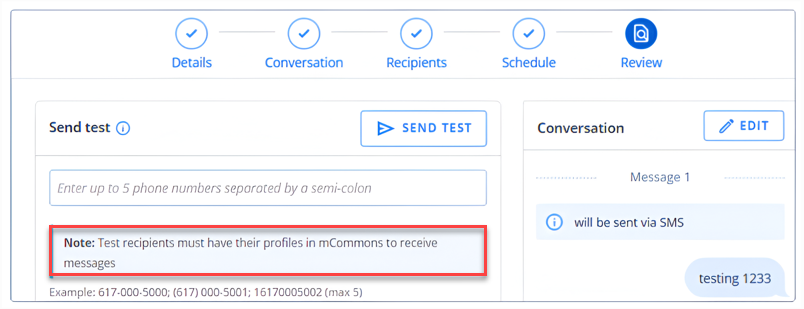
Broadcast “Send Test” Requires an Existing mCommons Profile — Info Banner:
The Broadcast Builder’s “Send Test” section now displays an informational tooltip reminding users that the functionality only delivers test messages to phone numbers that already exist as profiles within the mCommons platform. If the recipient's number is not in the system, the test message will not be sent. Please ensure the test number is added to the platform and subscribed to the relevant campaign before using Send Test.
Bug Fixes:
-
Fixed an issue where the compliance message in the Broadcast Builder’s Conversation tab would disappear when the cursor was placed in the message field. The compliance text now persists correctly and can be appended to broadcast messages as intended.
-
Resolved an issue where certain emojis inserted via the emoji picker in the Broadcast Builder were rendering as plain text characters in both the preview and the final received message. All supported emojis now display correctly.
-
Restored the “Test URL for your profile” option on trackable links configured with “Add Profile Information to HTTP Parameters.” This option had been unintentionally removed and is now visible again, allowing users to generate a personalized test URL to verify profile parameter pass-through.
-
Resolved an error causing the mConnects page to break when loading inactive mConnects with missing destination number data. The page now handles null values gracefully and loads correctly.
March 2026
Enhancement:
Broadcast Group Timeout Alert — Automatic Draft Revert:
If a broadcast’s target group fails to finish processing within the 30 minutes allotted time window, the system will now automatically move the broadcast back to DRAFT status and send an alert to subscribed company users. This prevents broadcasts from being sent to incomplete or partially built audiences, giving you the opportunity to review and reschedule.
Bug Fixes:
-
Fixed an issue in the Broadcast Builder, where using the “Insert Link” option would create an unexpected line break and move the cursor to the beginning of the message.
-
Resolved an issue where Liquid template expressions using the greater-than operator displayed an “unexpected character” error in the Broadcast Builder preview, even though the Liquid rendered correctly at send time.
-
Fixed the mConnect round-robin feature at the profile level, so that subsequent calls correctly rotate through all assigned legislators instead of repeatedly connecting to the same one.
February 2026
Enhancements:
-
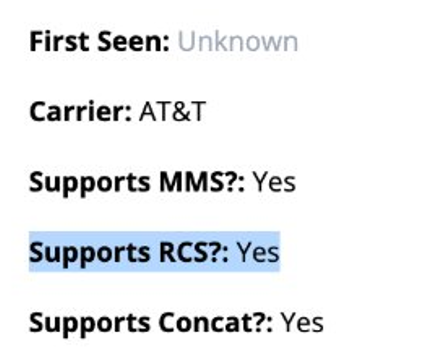
RCS Support Indicator on Profile Details:
A new "Supports RCS?" field is now visible on Profile details and Phone records pages. This allows you to quickly identify which profiles are compatible for RCS messaging directly from the profile view or the Phones table.
-
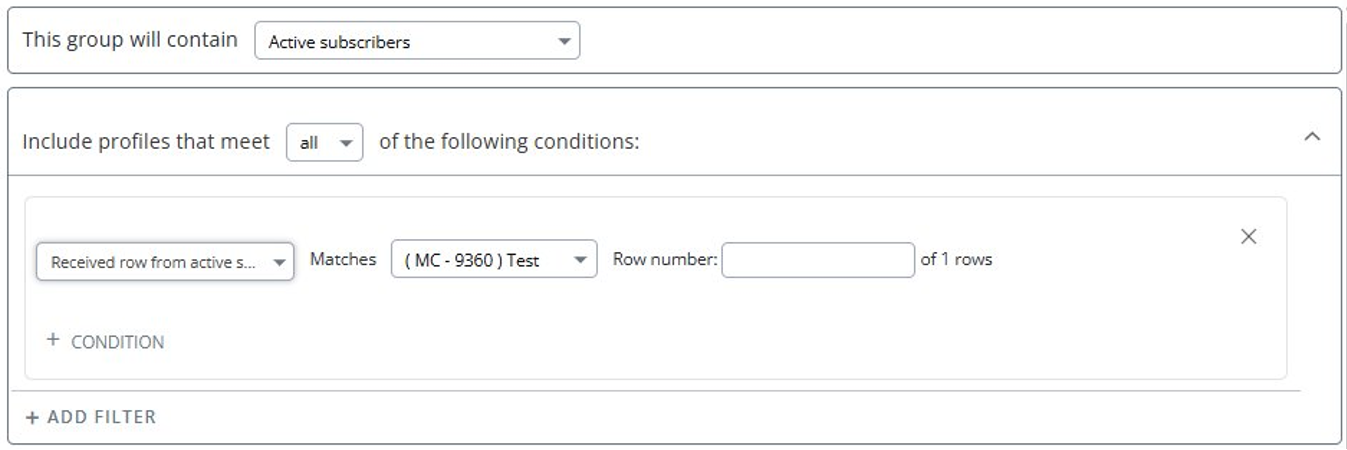
Dynamic Groups — "Received Row from Active Schedule" Filter Improvement:
The "Received Row from Active Schedule" filter now includes recipients from all versions of a row, not just the current conversation version. This means profiles who received a specific row from an archived version of a schedule will now be properly captured, making it easier to advance profiles through sequential campaigns.
-
Engaging Networks Integration — Suppressed Profile Sync:
Profiles marked as "Suppressed" in Engaging Networks will now sync into mCommons. Since Engaging Networks suppression is based on email activity (hard/soft bounces, spam flags) and not SMS, these profiles remain valid for text messaging and will no longer be excluded from syncs.
-
Salesforce Lightning — Liberal Sync Toggle:
The Salesforce Lightning CRM sync now properly respects opt-in status during the daily contact sync process. Records will only be created and subscribed in mCommons if their opt-in status field is set to true, unless the "liberal sync" toggle is explicitly enabled — bringing Lightning sync behaviour in line with all other CRM integrations.
Bug Fixes:
-
Fixed an issue where time zone-based broadcasts were only executing for one time zone.
-
Improved the loading speed of broadcast report pages. Previously, reports were loading slowly with charts appearing before broadcast stats, and multi-message flows were rendering out of order.
-
Fixed an issue where the "Last Date Donated is" group filter was incorrectly including all profiles who donated within a date range, rather than filtering by their most recent donation date. Groups using this filter will now correctly reflect only profiles whose last donation falls within the specified range.
-
Resolved an issue within trackable link click reports caused by bot traffic not being properly filtered. Click reports will now accurately exclude automated/bot clicks and reflect genuine subscriber engagement.
-
Improved the display of the Broadcasts "Length" column link, which redirects to the Conversation tab. For sent broadcasts, the view previously appeared broken.
-
Addressed a scenario where profiles that had been opted out of a Smart Campaign (due to no longer matching group criteria) were not being re-enrolled when they matched the criteria again. Affected profiles will now properly continue receiving scheduled messages from the point where they left off.
January 2026
New Features:
-
[Integration] Modernized Login with Zitadel (SSO):
mCommons is migrating all users to Zitadel, a secure, industry-standard single sign-on (SSO) platform. This replaces the legacy UCM authentication system and brings stronger security, including mandatory two-factor authentication, to better protect your account and data.
For more information, see:
-
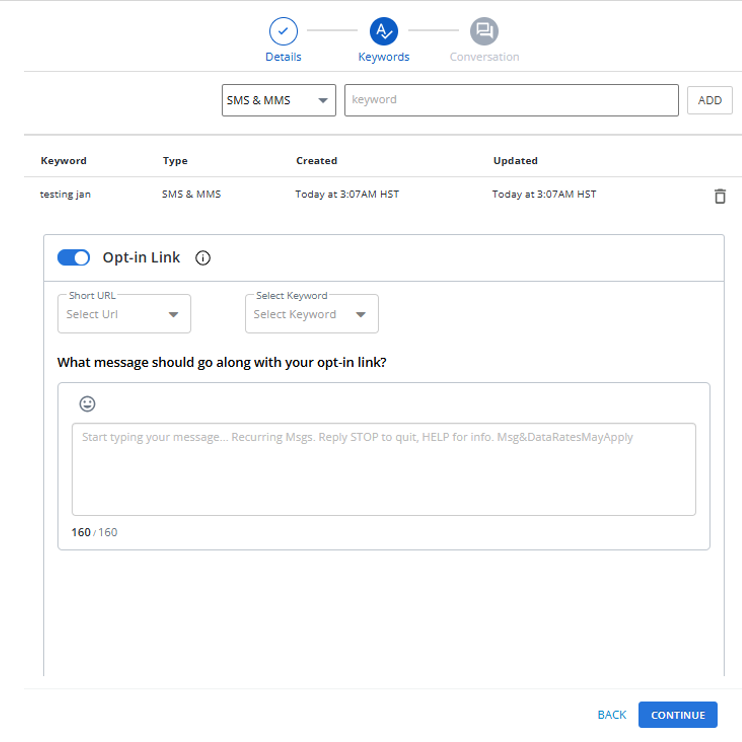
New Engagement Link for Easier Opt-Ins:
You can now create an Engagement Link from the Links section. The message can be shared via a URL or QR code and used within Opt-In Paths to enrol recipients seamlessly. When users open the link, their phone is pre-populated with the correct keyword, making opt-ins faster and error-free.
Enhancements:
-
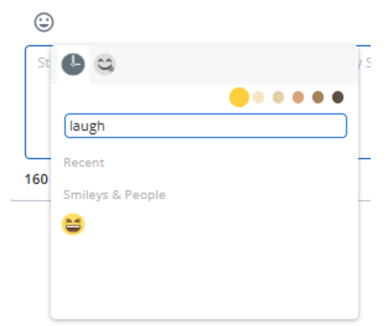
Searchable Emoji Picker:
Finding the right emoji just got easier. The emoji picker now includes a search option, helping you quickly locate emojis while composing messages.
-
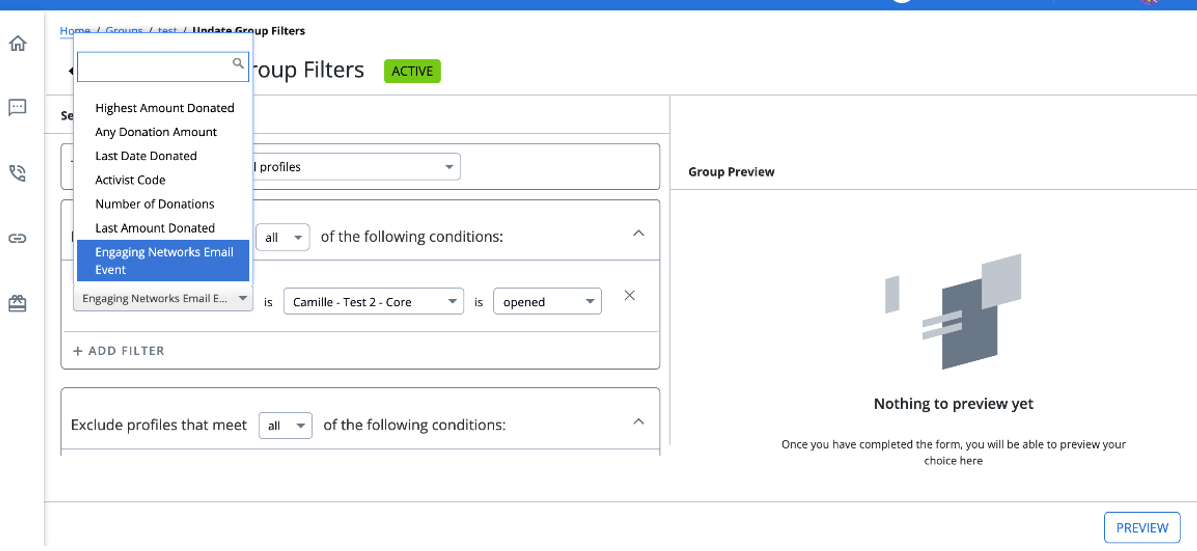
[Engaging Network] Filter Groups by Email:
For customers synced with Engaging Networks, you can now create groups based on email activity, such as:
• Email opened
• Email clicked
This makes it easier to target highly engaged supporters.
-
RCS Compatibility Indicator on Profiles:
A new “Supports RCS?” field is now available on individual profiles, clearly indicating whether a profile is eligible to receive RCS messages.

-
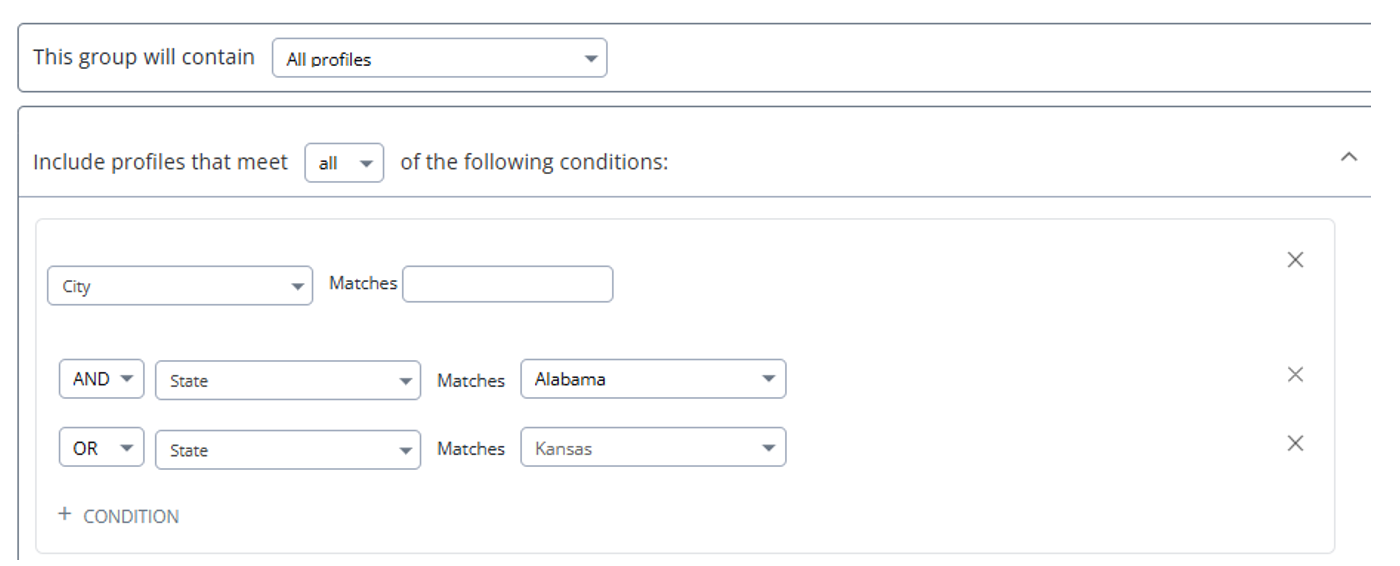
Advanced Group Filters with Nested Logic:
Group creation is now more powerful with support for nested filter conditions. You can combine multiple conditions using mixed AND / OR logic within the same group, allowing for more precise audience targeting.
-
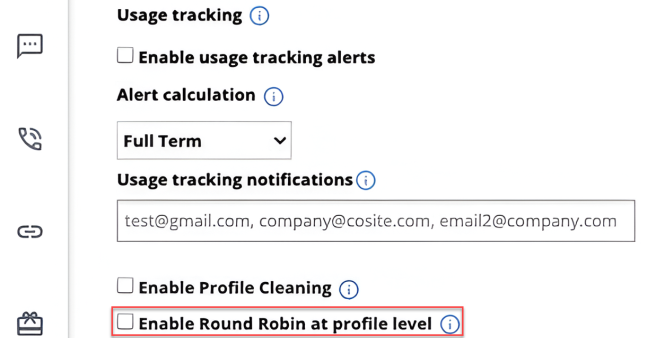
Profile-Level Round Robin Assignment:
A new setting, “Enable Round Robin at Profile Level,” has been added under Configure Company. When enabled, round robin assignment will occur at the individual profile level for more balanced distribution.
-
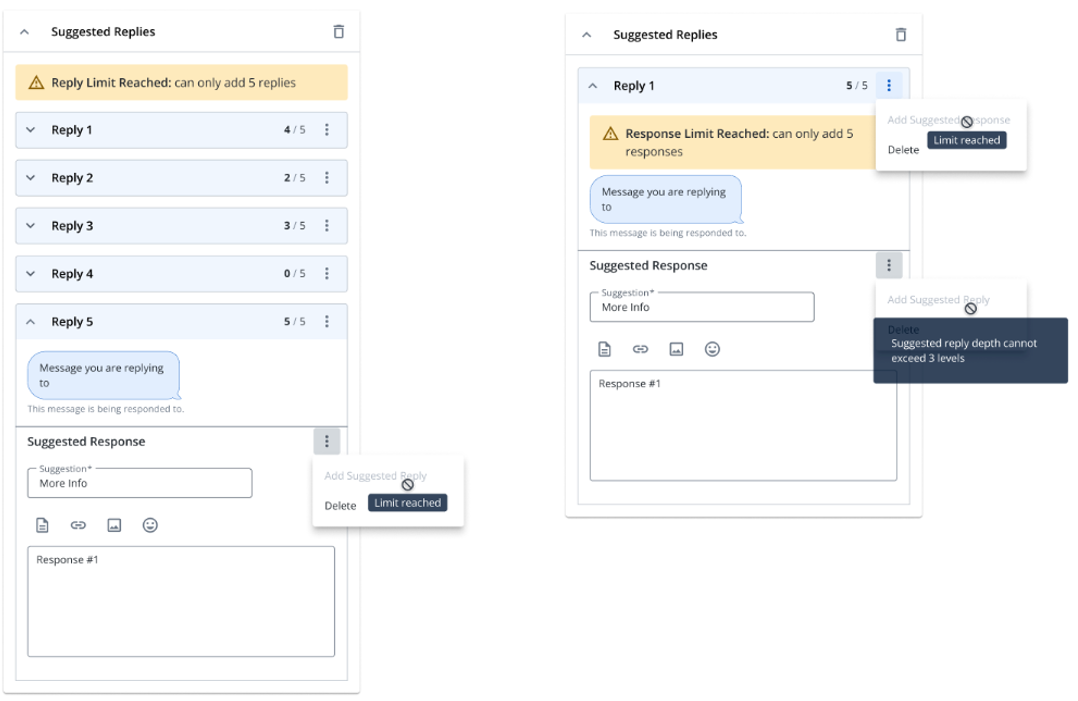
Suggested Reply Limits for RCS:
To ensure optimal performance and maintain RCS best practices, Suggested Reply nodes now support a maximum of 5 replies. Once the limit is reached:
• A banner appears informing you of the limit.
• The “Add Suggested Reply” option is disabled.
Bug Fixes:
-
Fixed an issue where the Verification Code and PIN fields were auto populated when creating a PIN. These fields now appear blank, as expected.
-
Resolved an issue where group exports and trackable link reports were generating CSV files with zero rows despite having data.
-
Fixed an issue where valid latitude and longitude coordinates were incorrectly rejected when added to RCS Location Suggested Actions.